Connecting Multiple Heat Pumps
Up to 16 heat pumps can be connected and controlled from a primary heat pump.
There are two benefits for using a multiple heat pump configuration:
- Controlling multiple heat pumps from one location; the primary heat pump.
- Preventing heat pumps from starting up at the same time and causing an excessive power draw on the electric circuit.
NOTICE
Failure to heed the following may result in damage to equipment.
- The wire size connecting the heat pumps must be 22-gauge stranded, 3-conductor, low-voltage wire. Be sure that the size of the wire will allow at least two wires per connection point.
- Do not attempt to connect heat pump equipment in multiple configurations with previous HP7 and HP7R versions of the control board. See Figure 1. No onboard port is provided for heat pumps with these control board versions. An Automatic Sequencing Controller (ASC) accessory is required for those types of heat pumps.
.jpg)
Firmware
The heat pumps with HP9 (Five button slide display) and HP11 (Five push button display) can be connected together in any configuration as shown. One requirement is to have the following firmware installed on each heat pump before making connections.
- HP9 v2.062 (or higher) -- All HP9 equipped Heat Pumps must be using the same firmware version.
- HP11 v0.047 (or higher) - All HP11 equipped Heat Pumps must be using the same firmware version.
- Check current firmware version. Directions on how to do this are in the heat pump's manual.
- Update firmware as needed. Contact AquaCal AutoPilot, Inc. customer support for an appropriate firmware update.
- If a PoolSync® device is connected to the heat pumps, the firmware can be upgraded online.
- If the heat pumps do not have a PoolSync® device connected to the internet, a file can be emailed to the customer and loaded onto a USB with the appropriate firmware. The USB drive can then be used to update the heat pump. Directions on this procedure can be sent to the user.
- Choose one unit to be the lead (or primary) unit. This is typically a unit that can be accessed easily when temperature adjustments are needed.
- Deactivate power to heat pumps. Wait two minutes for capacitors to discharge.
- Remove electrical access panels.
- Route 22-gauge stranded, 3-conductor, wires to the low voltage sides of the electrical enclosures. Follow all National Electric Codes (NEC) and / or State and Local guidelines.
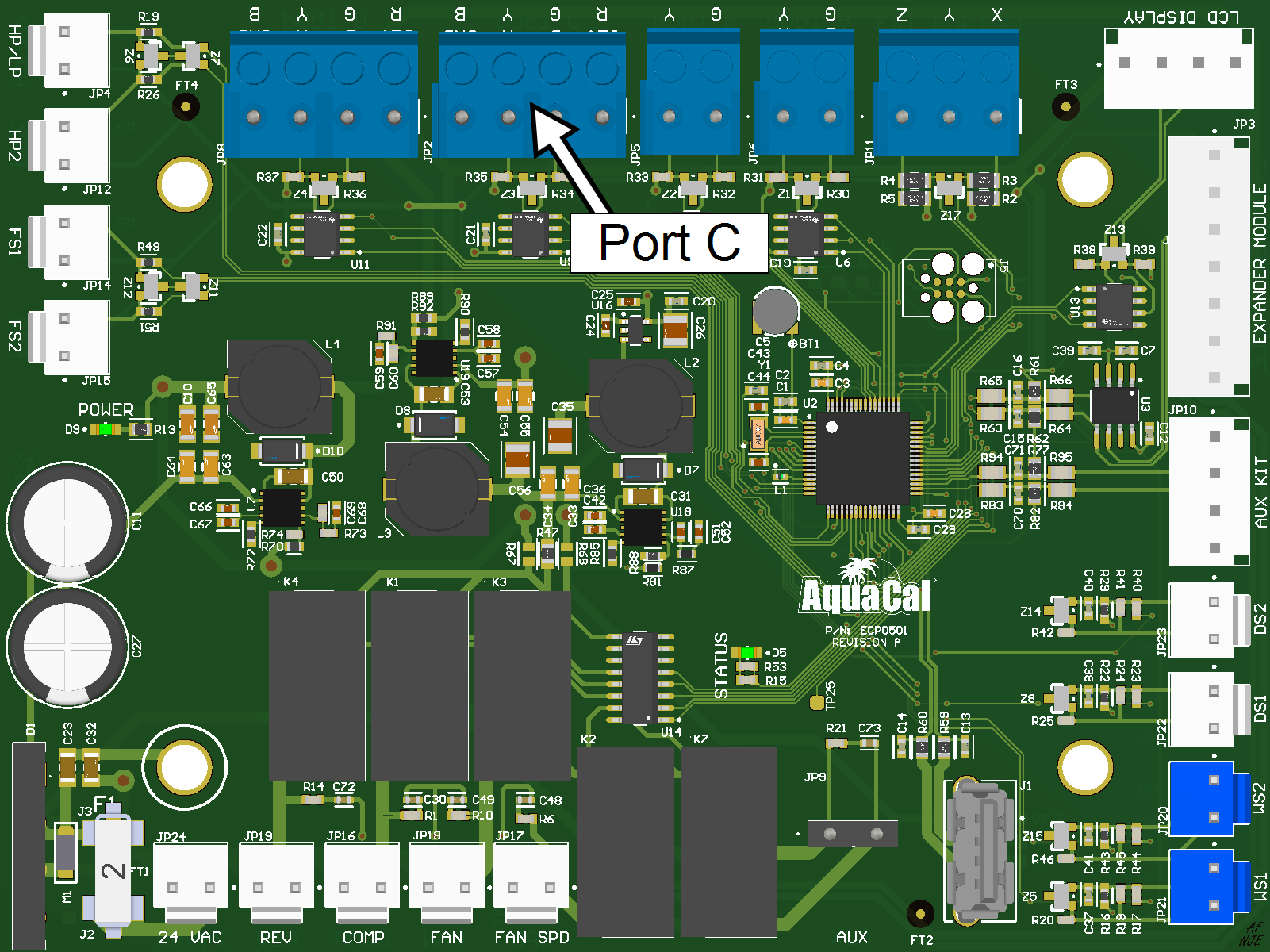
- Connect wiring to the 'Lead" or primary unit Port "C" as follows.
- Connect the wires from the primary unit port "C" terminal to the Secondary unit port "C" terminals, while maintaining the same wiring sequence for all the connections.
- For additional secondary units, add a second set of wires to the Port "C" terminal on the secondary unit that was just connected, then connect to the next units Port "C" terminal.
- Maintain the same wiring sequence (color) when connecting one system to the next.
- Disregard terminal designations for units using both HP9 and HP11 controls.
- Repeat this process for all additional secondary units on the system.
- Label the heat pumps appropriately as a primary unit and secondary units (Primary, Secondary 01, Secondary 02, etc.) to simplify configuration and future operation.
- Program heat pumps with assigned addresses. See "Configure Primary Heat Pump".
 2018.png)
Configure Primary Heat Pump
Confirm the first connected heat pump is designated as the primary unit.
Enter "Advanced" menus, then proceed
A
PRESS MENU
BUTTON
/enter_level/enter_advanced-1.jpg)
B
USE ARROWS TO
"SYSTEM"
/enter_level/enter_advanced-2.jpg)
C
PRESS "ENTER"
/enter_level/enter_advanced-3.jpg)
D
USE ARROWS TO
"ADVANCED"
/enter_level/enter_advanced-4.jpg)
E
PRESS "ENTER"
/enter_level/enter_advanced-5.jpg)
1
USE ARROWS TO
"MULTI-UNIT"
/multiplehp/multipleunitmode_primay -01.jpg)
2
ENTER TO EDIT
/multiplehp/multipleunitmode_primay -02.jpg)
3
USE ARROWS TO
"MULTI-UNIT MODE"
/multiplehp/multipleunitmode_primay -03.jpg)
4
ENTER TO EDIT
/multiplehp/multipleunitmode_primay -04.jpg)
5
USE ARROWS TO
CHANGE TO "PRIMARY"
/multiplehp/multipleunitmode_primay -05.jpg)
6
ENTER TO SAVE
/multiplehp/multipleunitmode_primay -06.jpg)
MENU TO EXIT, PRESS
& HOLD TO STATUS
/enter_level/exit_menus_heat.jpg)
Configure Secondary Heat Pumps
Go to the next connected heat pump and configure it as a secondary unit with a heat pump address of "01". Each additionally connected heat pump will require a unique heat pump address ("02", "03", etc.)
Enter "Advanced" menus, then proceed
A
PRESS MENU
BUTTON
B
USE ARROWS TO
"SYSTEM"
C
PRESS "ENTER"
D
USE ARROWS TO
"ADVANCED"
E
PRESS "ENTER"
1
USE ARROWS TO
"MULTI-UNIT"
/multiplehp/multipleunitmode_secondary -01.jpg)
2
PRESS ENTER TO EDIT
/multiplehp/multipleunitmode_secondary -02.jpg)
3
USE ARROWS TO
"MULTI-UNIT MODE"
/multiplehp/multipleunitmode_secondary -03.jpg)
4
ENTER TO EDIT
/multiplehp/multipleunitmode_secondary -04.jpg)
5
USE ARROWS TO
"SECONDARY"
/multiplehp/multipleunitmode_secondary -05.jpg)
6
ENTER TO SAVE
/multiplehp/multipleunitmode_secondary -06.jpg)
7
USE ARROWS TO
CHANGE ADDRESS
/multiplehp/multipleunitmode_secondary -07.jpg)
8
ENTER TO SAVE
/multiplehp/multipleunitmode_secondary -08.jpg)
9
CONFIRM OK TO CLEAR
EXISTING SETUPS
/multiplehp/multipleunitmode_secondary -09.jpg)
Please note:
This action will wipe all previous settings in favor of the new configuration. This includes external controller settings, optional device settings, groups, equipment, schedules, and site specific settings. Additional site specific settings may need to be put in place.
The system will restart. The heat pump will now need to be controlled by the primary heat pump.
NOTE
In the event there is a mechanical problem with the primary unit. Any of the secondary units can easily be reconfigured as the lead unit without making any wiring changes. Be sure to turn off power to the lead unit if making another unit the Primary.
-
An exception would be if using a WI-FI device, then the device will need to be wired to the new Primary unit.